
Learn Affinity Photo/Pixel the Easy Way
Stop Searching Through Hundreds of YouTube Videos
If you've watched my free YouTube tutorials, you already know my teaching style.
The question you're probably asking is:
“Why should I buy the course when I can watch your videos for free?”
That's a fair question.
YouTube is great for solving one problem. This course is designed to help you master Affinity Photo/Pixel from start to finish.
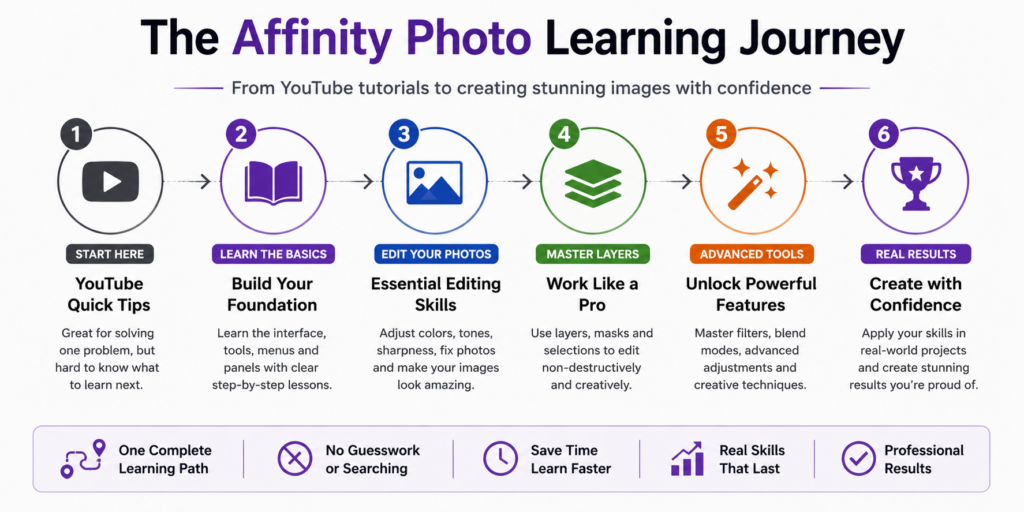
Instead of searching for the next tutorial every time you get stuck, you'll follow a carefully organized learning path where every lesson builds naturally on the previous one.
No guessing what to learn next. No wasted hours searching. Just clear, step-by-step instruction that takes you from beginner to confident Affinity Photo/Pixel user.
Whether you're editing family photos, making graphics for a business, restoring pictures, or replacing an expensive Photoshop subscription, this course gives you everything you need in one place.
Why Choose the Complete Course?
| Free YouTube Videos | Complete Training Course |
|---|---|
| ✔ Great for quick answers | ✔ Complete step-by-step learning system |
| ❌ Videos are scattered | ✔ Organized from beginner to advanced |
| ❌ Search for each topic | ✔ Every lesson is already planned |
| ❌ Learn one trick | ✔ Master the whole program |
| ❌ No practice projects | ✔ Practice Files Included |
| ✔ Free | ✔ Lifetime access for one low price |
Your Complete Affinity Photo/Pixel Training Includes
Regular Price: $79.95
Special Online Pricing $39.87
Start learning Affinity Photo today with lifetime access.
Start the Complete Course
where you will setup a username and password
Try Before You Buy
Watch the first module absolutely FREE. No registration required
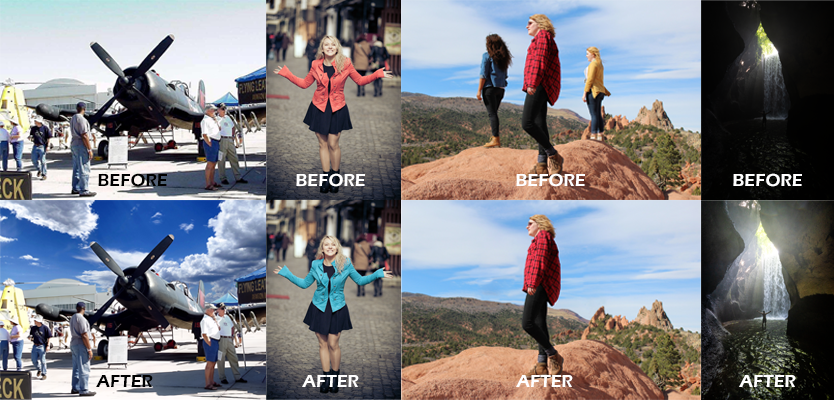
See What You'll Be Able to Create
Affinity Photo/Pixel is incredibly powerful—but only if you know how to use it. This course teaches the techniques professionals use every day through simple, step-by-step lessons anyone can follow.


Remove Unwanted People
Erase distractions cleanly using pro retouching techniques.


Replace Boring Skies
Create dramatic landscapes in just a few minutes.


Restore Old Photos
Bring faded family memories back to life.



Create Amazing Graphics
Use text, layers, effects to produce professional artwork.
Everything Included With Your Course
When you enroll today, you'll receive lifetime access to everything below.
| ✔ Complete Affinity Photo/Pixel 2 & 3 Course | $79 Value |
| ✔ 174 Step-by-Step Video Lessons | Included |
| ✔ 13.5 Hours of Professional Training | Included |
| ✔ Practice Images | Included |
| ✔ Project Files | Included |
| ✔ Windows & Mac Support | Included |
| ✔ Free Course Updates | Included |
| ✔ Lifetime Access | Priceless |
Today Only $39.87
$79.95 You Save 50%
Start Learning Today!
where you will setup a username and password
Your Complete Affinity Photo/Pixel Learning Roadmap
This is not a random collection of videos. The course is organized into a clear step-by-step learning path, so you always know what to learn next.
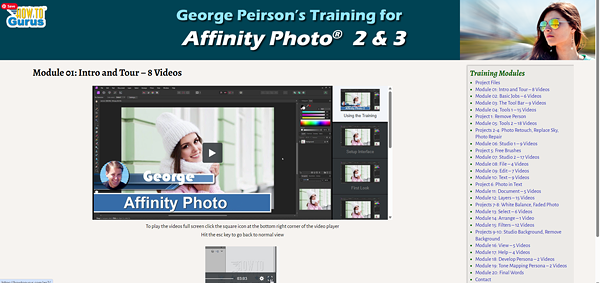
Getting Started
Get comfortable with Affinity Photo and learn how the program is organized.
✔ Interface setup
✔ Photo Persona
✔ Develop Persona / RAW
✔ Export Persona
Basic Photo Jobs
Learn the essential everyday tasks you need for real photo editing work.
✔ Open, save, and export files
✔ Crop and resize images
✔ Place images
✔ Print projects
Tools & Editing
Master the core editing tools used for selections, painting, retouching, and corrections.
✔ Selection tools
✔ Brush and erase tools
✔ Clone, healing, and inpainting
✔ Text and shape tools
Layers & Adjustments
Understand one of the most important parts of Affinity Photo: layers.
✔ Layer stacking
✔ Adjustment layers
✔ Masks
✔ Blend modes
Advanced Features
Go deeper with the tools and features that make Affinity Photo so powerful.
✔ Filters and live filters
✔ HDR merge
✔ Panoramas
✔ Tone mapping
Practice Projects
Apply what you've learned with real-world projects that build confidence.
✔ Remove a person
✔ Replace a sky
✔ Restore old photos
✔ Remove backgrounds
174 Video Lessons. 13.5+ Hours. One Clear Learning Path.
After the roadmap, you can still review the complete lesson list below — but this gives you the big picture of how the course guides you from beginner to confident Affinity Photo user.
Meet Your Instructor
If you've watched my YouTube videos, you already know my teaching style. This course takes that same approach and organizes it into a complete learning system.

Hi, I'm George Peirson.
I've spent more than two decades helping people learn photo editing software. During that time I've created thousands of tutorial videos and helped students around the world become confident using programs like Affinity, Photoshop Elements, Photoshop, Lightroom, and more.
My teaching philosophy has always been simple:
Break complicated topics into simple, easy-to-follow lessons that anyone can understand.
That's exactly how this course is built. Every lesson builds naturally on the one before it, so you'll never feel lost or wonder what to learn next.
Whether you're opening Affinity Photo/Pixel for the very first time or looking to master advanced editing techniques, I'll guide you through every step.
No confusing jargon.
No skipped steps.
No assuming you already know the answer.
Just practical, real-world training designed to help you become confident with Affinity Photo/Pixel as quickly as possible.
Learn from Someone Who Teaches Full-Time
This course is the result of years of teaching, thousands of tutorials, and answering countless student questions. Instead of trying to piece everything together from random videos, you can follow one complete learning path from beginning to end.
Start Learning Today!
where you will setup a username and password
Students Love Learning with How To Gurus
Over the years, students have used George's step-by-step training to finally understand photo editing software without feeling overwhelmed.
"...Well done George, these are worth every penny."

"...George knows this program inside and out...." 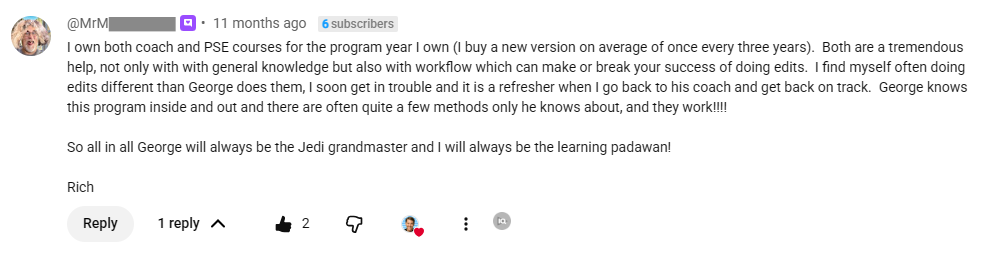
"...I always learn something from your video training..."

"...I purchased George's PSE training course, I highly recommend it."

"Your disks are better than the Total Training ones I have gotten with the Adobe software."
— How To Gurus Student
"Every so-called guru should be trained by these fellows. A first-class product."
— How To Gurus Student
"Excellent product and a great bunch of guys to do business with! 2 thumbs up!"
— How To Gurus Student
Trusted Step-by-Step Training
The goal is simple: make Affinity Photo easier to understand. Instead of fast, confusing lessons that skip important steps, this course walks you through the tools, menus, panels, adjustments, layers, filters, and real-world projects at a comfortable pace.
Clear explanations. Practical examples.
A complete path from beginner to confident user.
Frequently Asked Questions
Still have questions?
Here are answers to the questions we hear most often from new students.
Ready to Start Learning?
Thousands of students have discovered that learning from a structured course is faster and easier than trying to piece everything together from random tutorials.
Start your Affinity Photo/Pixel journey today.
Enroll Now
where you will setup a username and password
Start Learning Affinity Photo/Pixel Today
Imagine where you'll be after just a few evenings of structured learning.




✔ Stop searching through random YouTube videos.
✔ Follow one organized learning path from beginner to advanced.
✔ Learn every tool, menu, panel, and editing technique.
✔ Practice with real-world projects that build confidence.
✔ Watch at your own pace with lifetime access.
Today You'll Receive
Regular Price
$79.95
Today Only $39.87
One payment.
Lifetime access.
Start learning today.
Enroll Now
where you will setup a username and password
Still Not Sure?
Watch the first module absolutely FREE and experience my teaching style before making your decision.
Complete Course Curriculum
Want to see exactly what's included?
Below is the complete list of every lesson included in the course.
Ready to Start Learning Affinity Photo/Pixel?
You've now seen exactly what's included in the course.
If you're ready to master Affinity with a structured, step-by-step learning system, you can start today.
Regular Price
$79.95
Today Only $39.87
One payment.
Lifetime access.
Learn at your own pace.
where you will setup a username and password
✔ Secure Checkout
✔ Immediate Access After Purchase
✔ Create Your Account in Minutes
♾ Lifetime Access 💻 Windows & Mac
Questions Before You Enroll?
We're happy to help.
Contact us anytime if you have questions about the course before purchasing.
support@howtogurus.com